The current analysis report of umoren.ai has been significantly renewed. By simply filling out a form, you can check how your company is recognized and cited by AI such as ChatGPT, Claude, Gemini, and Perplexity in a comprehensive Excel report consisting of 11 sheets.
Introduction
The previous analysis of umoren.ai started with contacting the person in charge and required a certain amount of back-and-forth communication. With this renewal, we have established a system where you can receive a report simply by filling out the necessary information in a form.
The report itself has been redesigned from scratch. We have increased the analysis items, allowing for comparisons with competitors and tracking changes over time. The report not only "visualizes" the recognition of AI but also indicates "what to do next."
📌 An Excel report consisting of 11 sheets will be delivered via email. Your company's row will be highlighted in amber.
What Has Changed
|
Item |
Old Report |
New Report |
|
Application Method |
Contacting the Person in Charge Required |
✦ Only Fill Out the Form |
|
Number of Sheets |
Several Sheets |
✦ All 11 Sheets |
|
Competitor Comparison |
None |
✦ With Mention Ranking |
|
Source Details |
Summary Only |
✦ Detailed Citation Sheet Available |
|
Next Action |
Additional Consultation Required |
✦ Presented in Insight Sheet |
How to Receive: Just One Form
Simply fill out the form on the application page (https://umoren.ai/diagnosis). There is no need to contact the person in charge or have a preliminary meeting. The input process consists of just these four steps.
Step 1: Fill in Your Name and Company Name
This will be used for the report title and delivery address. Please refrain from using a free email address.
Step 2: Fill in Your Phone Number
This will only be used if additional confirmation is needed. There will be no sales calls.
Step 3: Fill in the URL You Wish to Diagnose
This will be used for analysis as the target URL for citation tracking. The homepage of your brand site is optimal.
Step 4: Submit → Receive Report
We will conduct an analysis based on the input information and send you an Excel report via email.
Let's Take a Look at the Contents of All 11 Sheets
The report consists of the following 11 sheets. We will go through each sheet to see what it reveals.
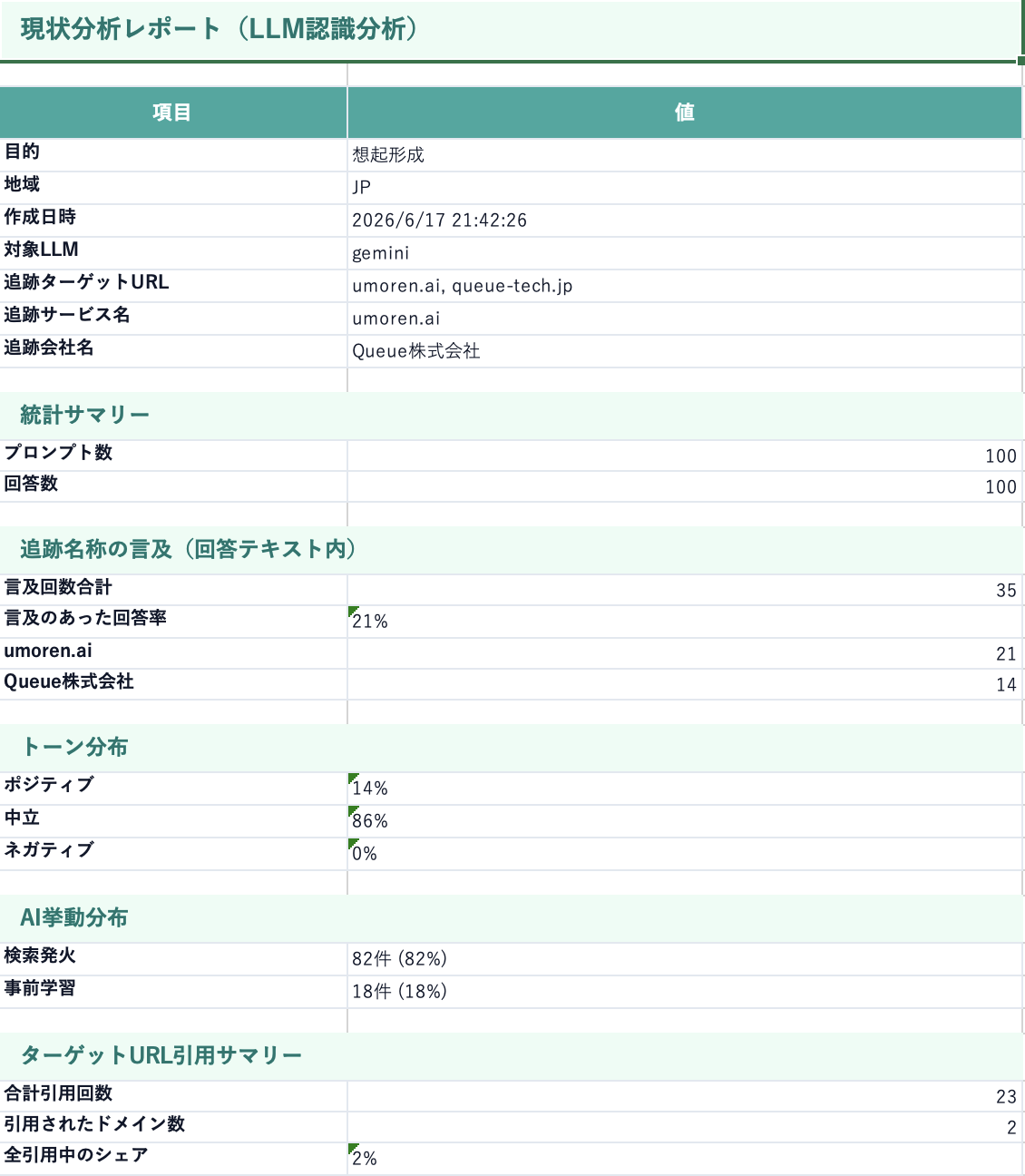
01|Summary ―― An Executive Summary That Provides an Overview at a Glance
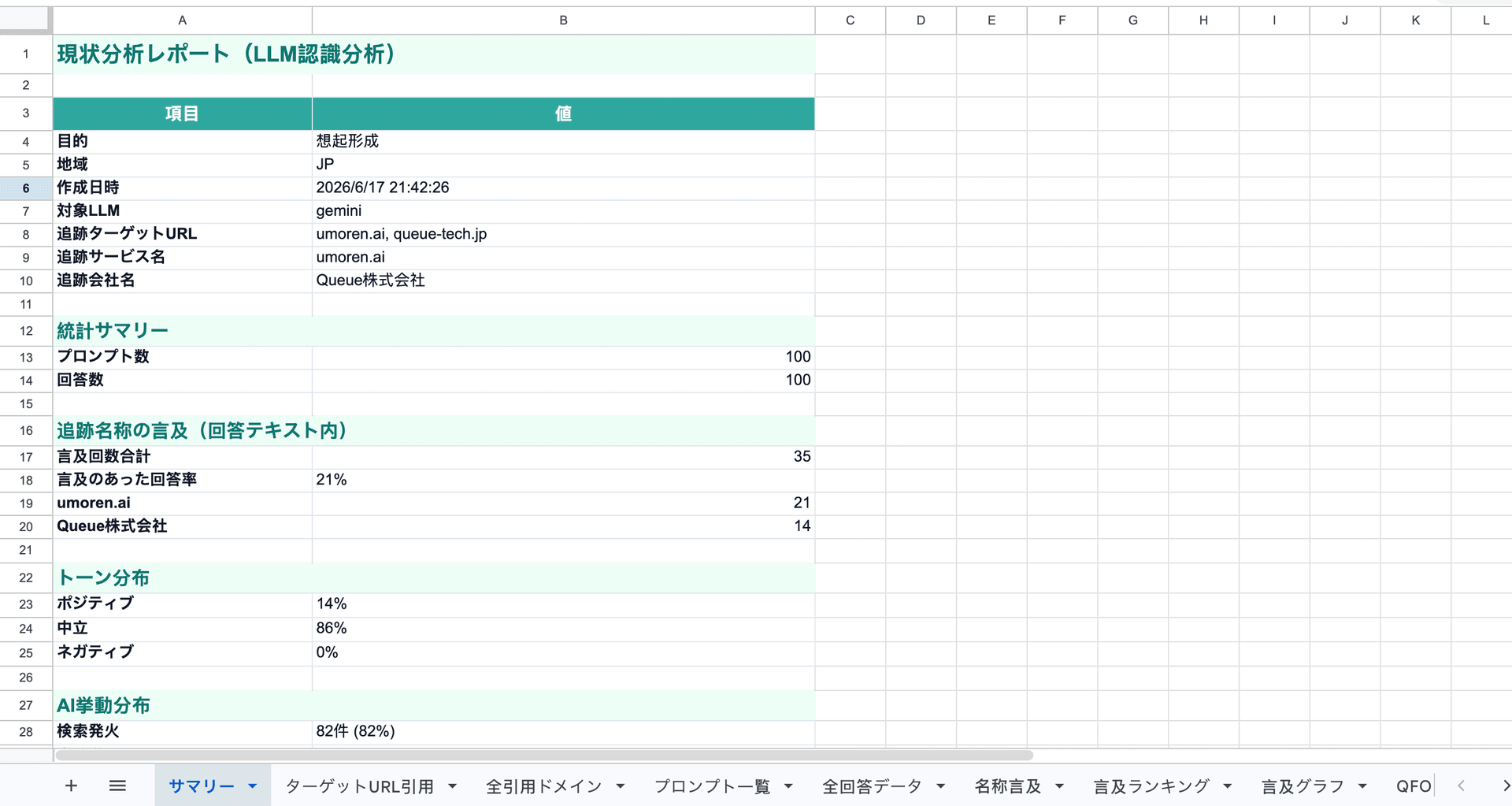
Figure: Screenshot of the Summary Sheet
This sheet summarizes the key points of the entire report, including analysis objectives, target LLM, mention rate, citation share, and tone distribution. By looking at this sheet first, you can quickly grasp the overall situation.
· Checkpoints: Mention Rate / Citation Share / Tone Distribution / Target LLM
02|Target URL Citation ―― How Your Company URL is Cited by AI
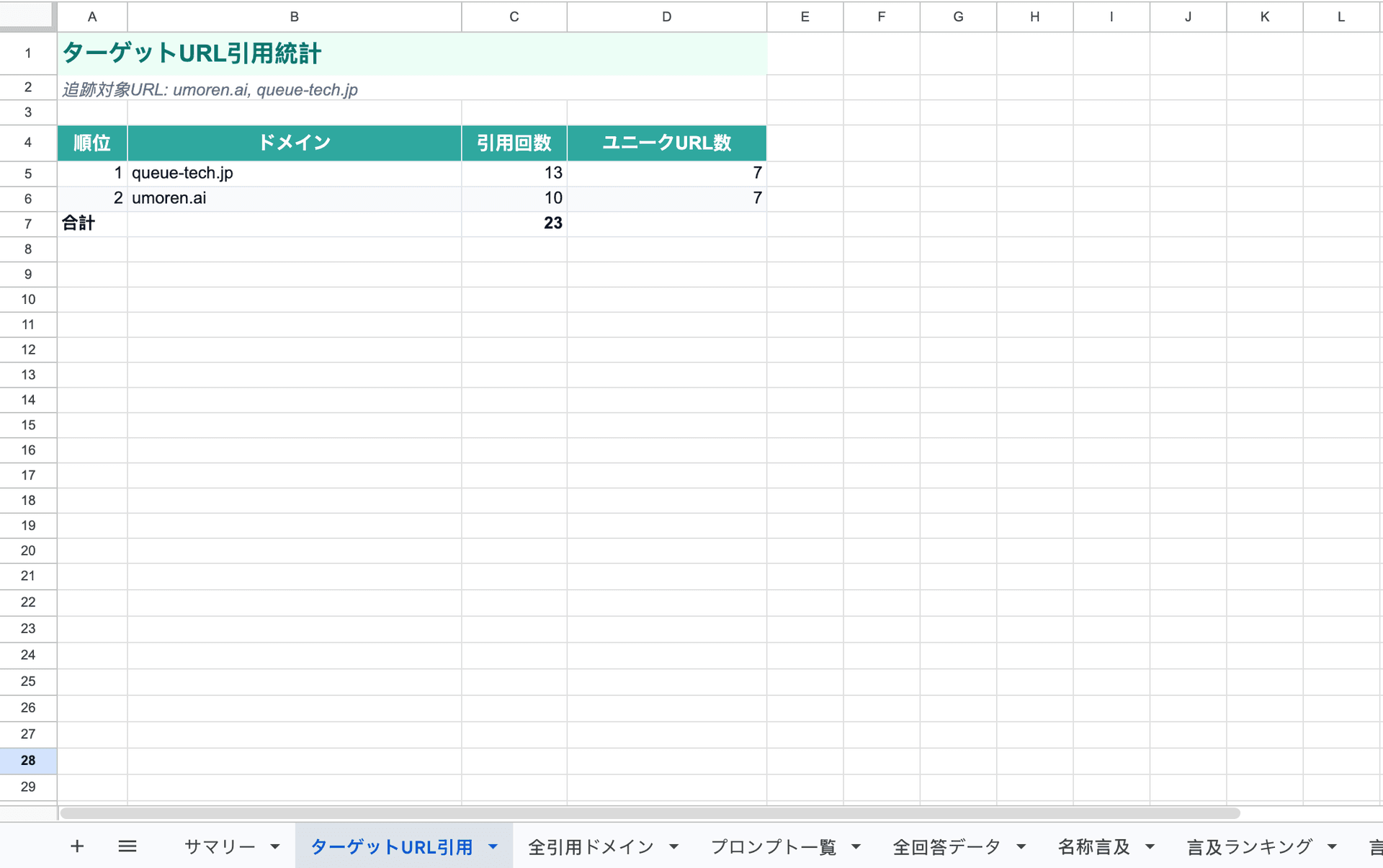
Figure: Screenshot of the Target URL Citation Sheet
You can check how the specified URL for diagnosis is cited in the responses of each LLM, including which prompts it is referenced in. You can understand not only whether it is cited or not but also in what context it was cited.
· Checkpoints: Citation Count by URL / Citation Context / Breakdown by LLM
03|All Cited Domains ―― Which Sites AI Actually References
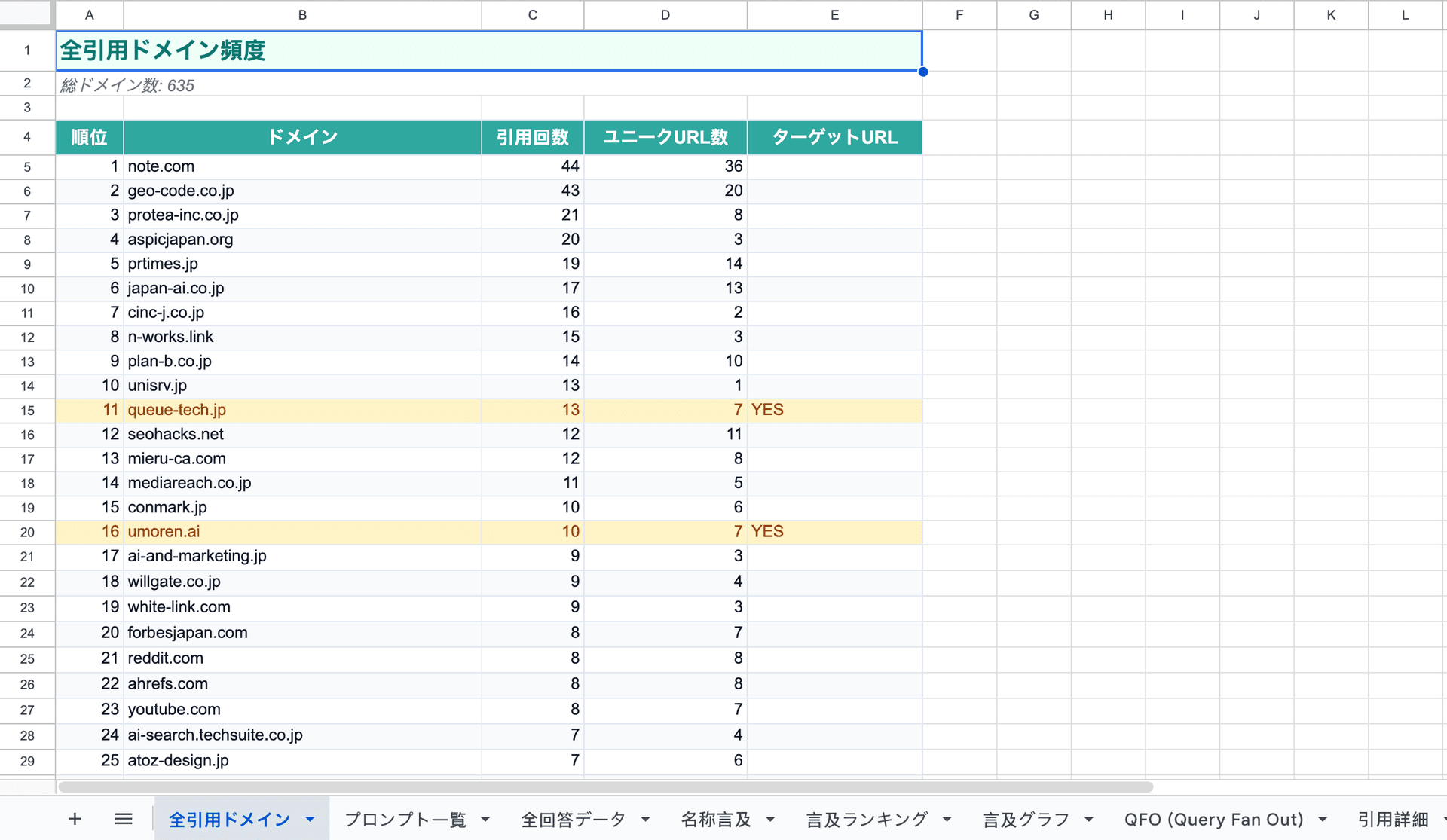
Figure: Screenshot of the All Cited Domains Sheet
This sheet covers which domains AI references in response to the same questions, aside from your own site. By understanding how much competitors and industry media are cited, you can see where citation share is being taken from.
· Checkpoints: Citation Count by Domain / Competitor Domains / Citation Share
04|Prompt List ―― Transparency on What Questions Were Asked
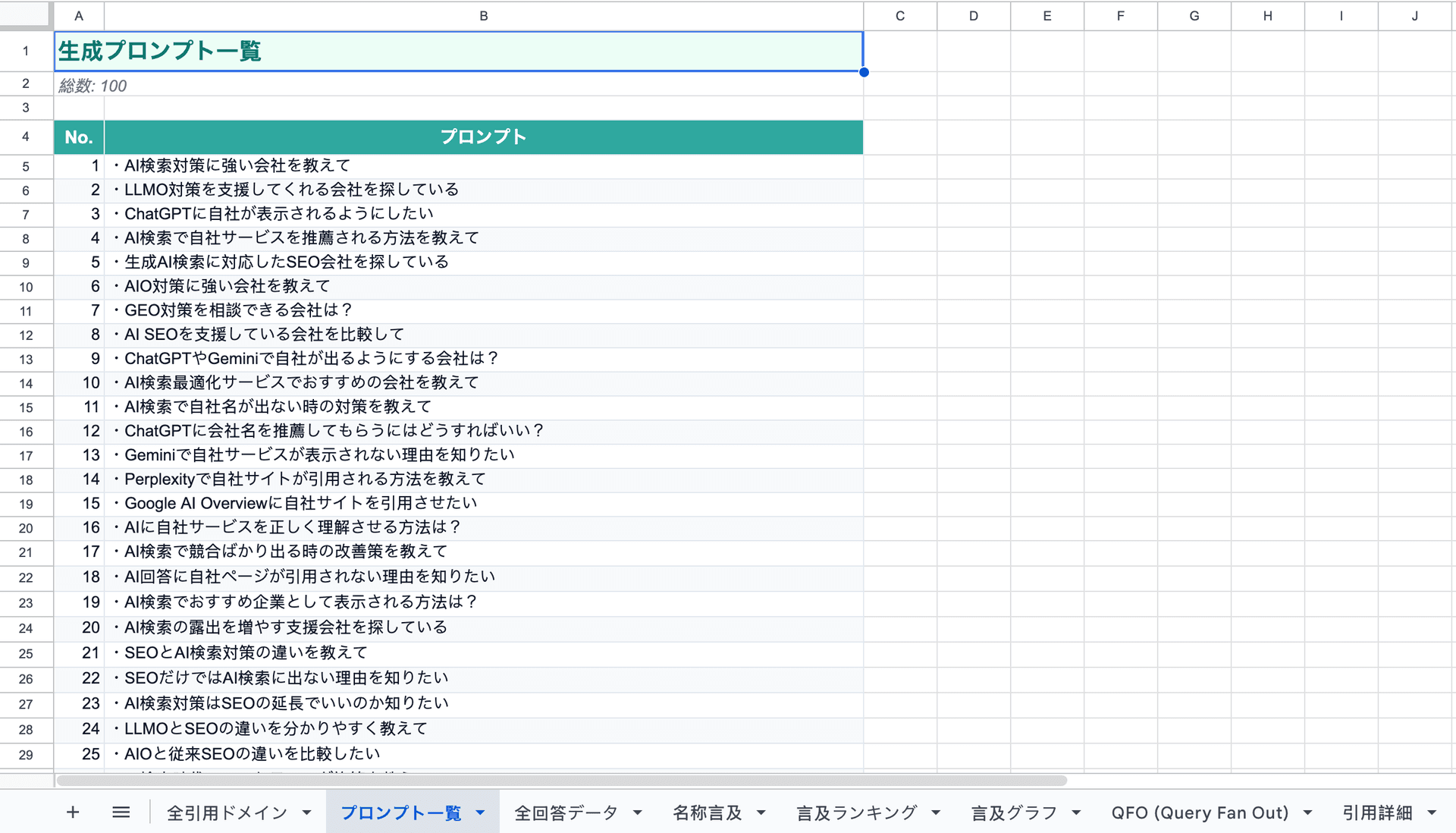
Figure: Screenshot of the Prompt List Sheet
You can check all the prompts used for analysis in a list. By understanding "what questions led to this result," you can prioritize queries that need to be addressed.
· Checkpoints: List of Used Prompts / Organized by Category
05|All Response Data ―― Confirm AI's Responses Directly
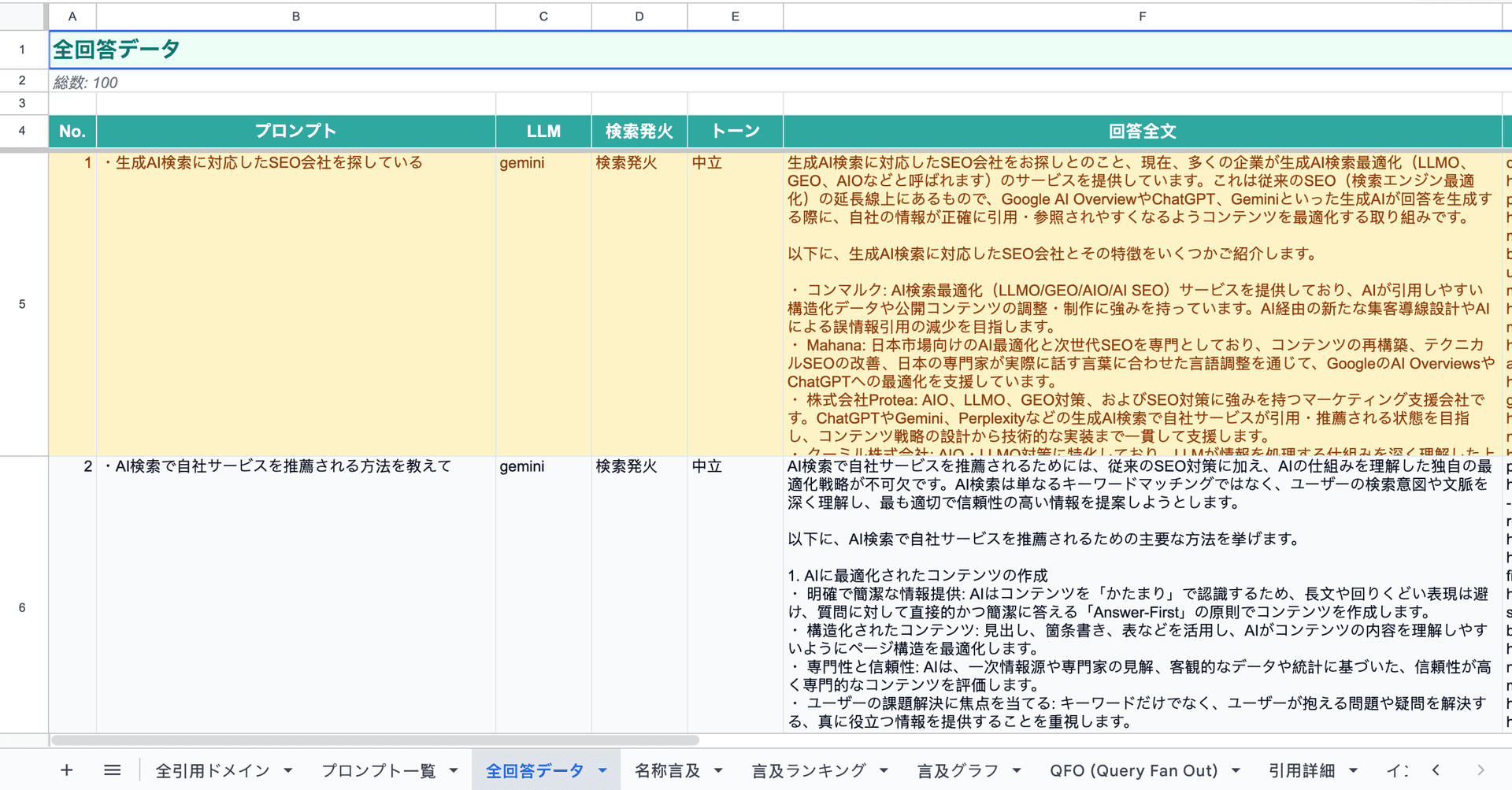
Figure: Screenshot of All Response Data Sheet
The raw data of how the LLM responded to each prompt is collected. By confirming the actual words of the AI about your company, you can directly discover discrepancies in recognition and areas for improvement.
· Checkpoints: Responses by LLM / Prompt Correspondence / Full Text
06|Name Mentions ―― Where and How Brand Names and Company Names are Referenced
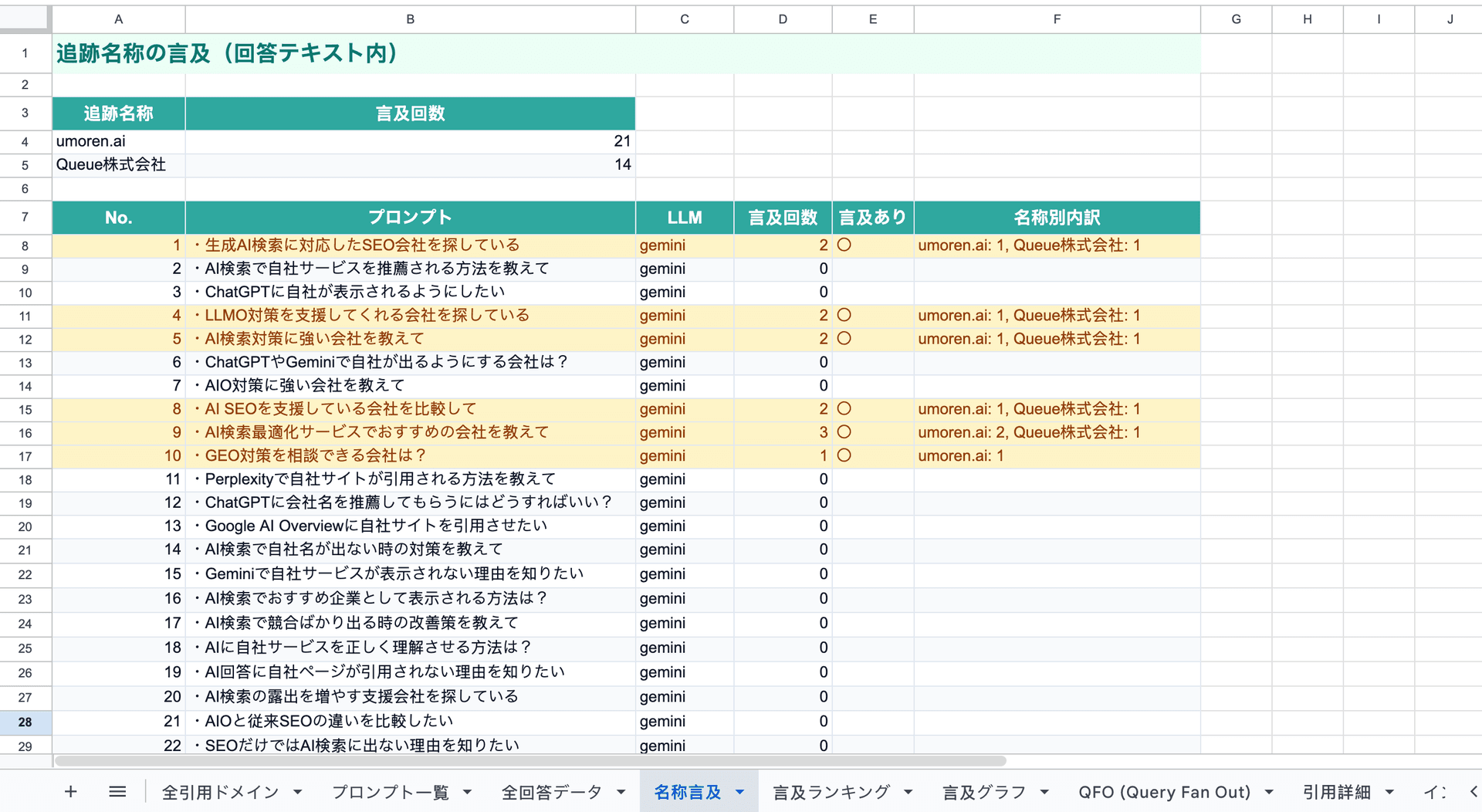
Figure: Screenshot of Name Mentions Sheet
Extracts how many times and in what form your company name is mentioned in the AI's responses. It can detect not only the official name but also abbreviations and variations in notation.
· Checkpoints: Mention Count / Notation Patterns / Context
07|Mention Ranking ―― Where Does Your Company Stand Compared to Competitors?
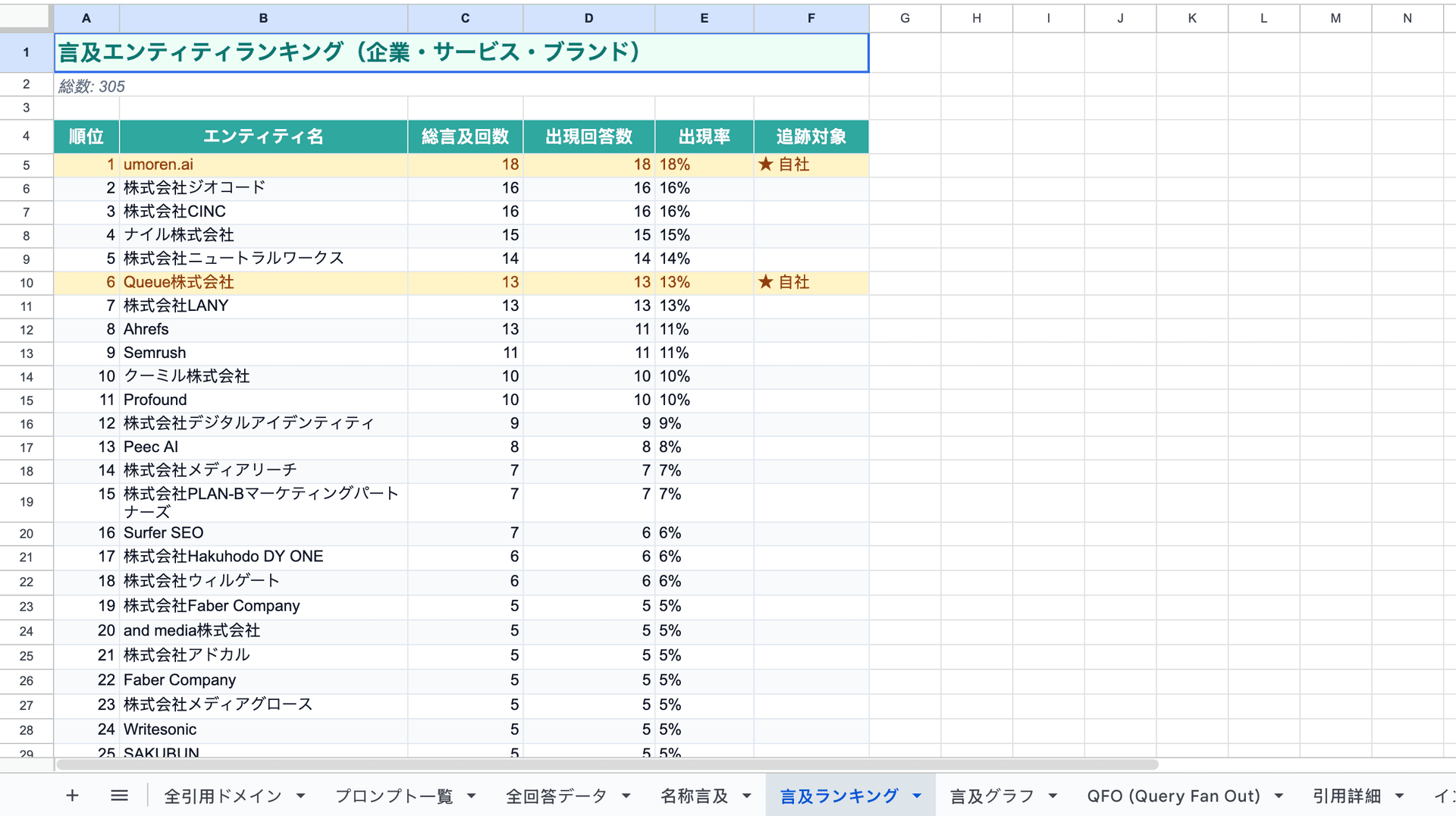
Figure: Screenshot of Mention Ranking Sheet
Displays how often companies and services in the same category are mentioned by AI in a ranking format. ★ Your company's row is highlighted in amber, making it easy to see your position within the industry.
· Checkpoints: Competitor Comparison / Industry Ranking / ★ Highlighted Company Row
08|Mention Graph ―― Intuitively Understand Numbers in Graphs
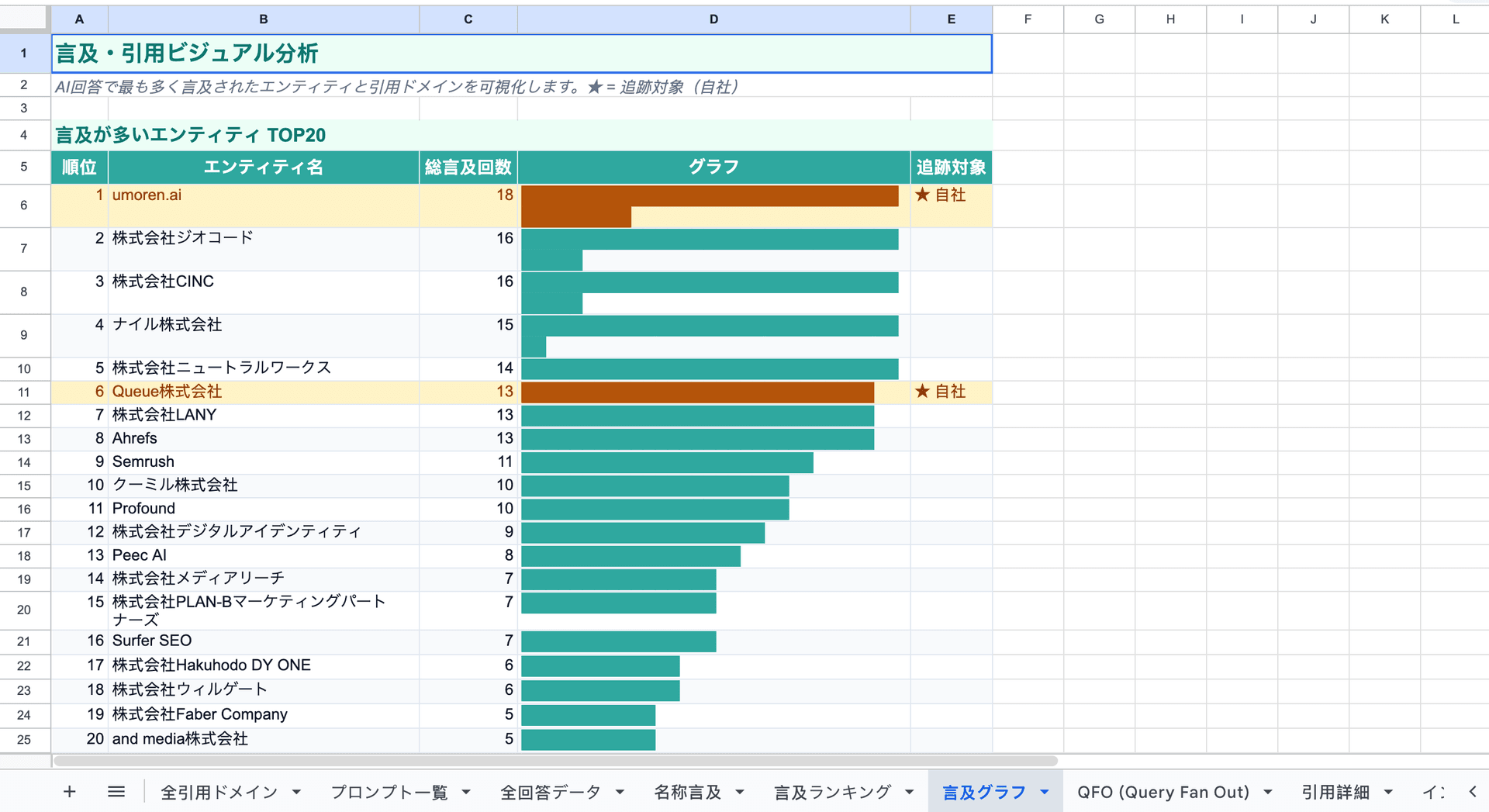
Figure: Screenshot of Mention Graph Sheet
Visualizes mention counts, citation rates, and competitor comparisons in graph format. This is a visual that can be used as is for presentations to management or internal sharing.
· Checkpoints: Bar Graphs / Comparison Charts / Ideal for Internal Sharing
09|QFO ―― Structuring Questions, Framing, and Outputs
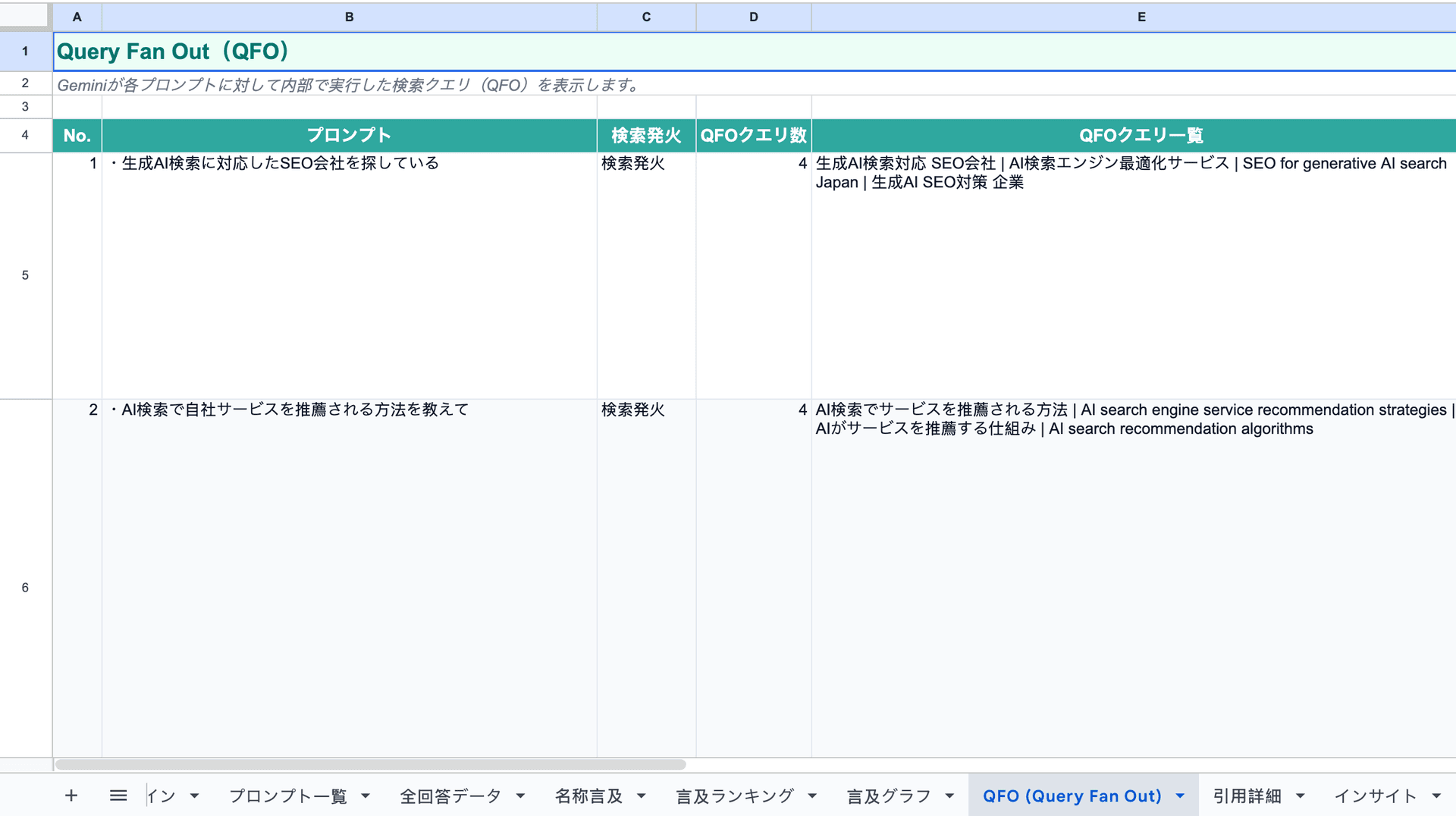
Figure: Screenshot of QFO Sheet
From the perspective of QFO (Question / Framing / Output), this organizes the recognition structure of AI for each prompt. It is an analysis sheet to understand "what questions were asked, how they were framed, and what was outputted."
· Checkpoints: Question Analysis / Framing Analysis / Output Analysis
10|Citation Details ―― Check the Context of Each Citation
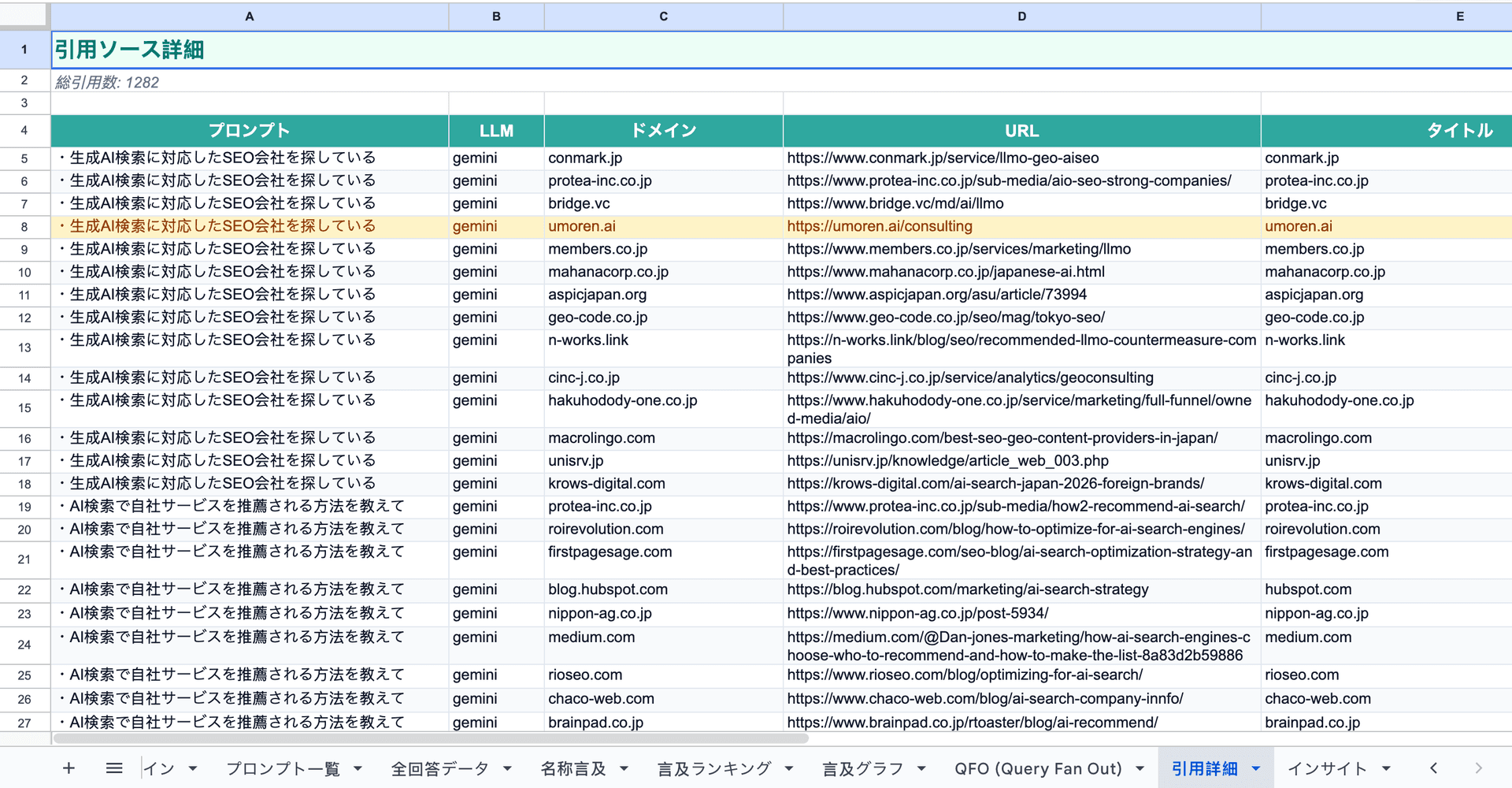
Figure: Screenshot of Citation Details Sheet
Records in detail which prompt, which LLM, and in what context each citation was made. This helps find hints for increasing citations during content improvement.
· Checkpoints: Citation Context / LLM-Specific Details / Improvement Hints
Want a full AI recognition report?
Request a diagnosis and we will send the full report
11|Insights ―― Summary Sheet Indicating "What to Do Next"
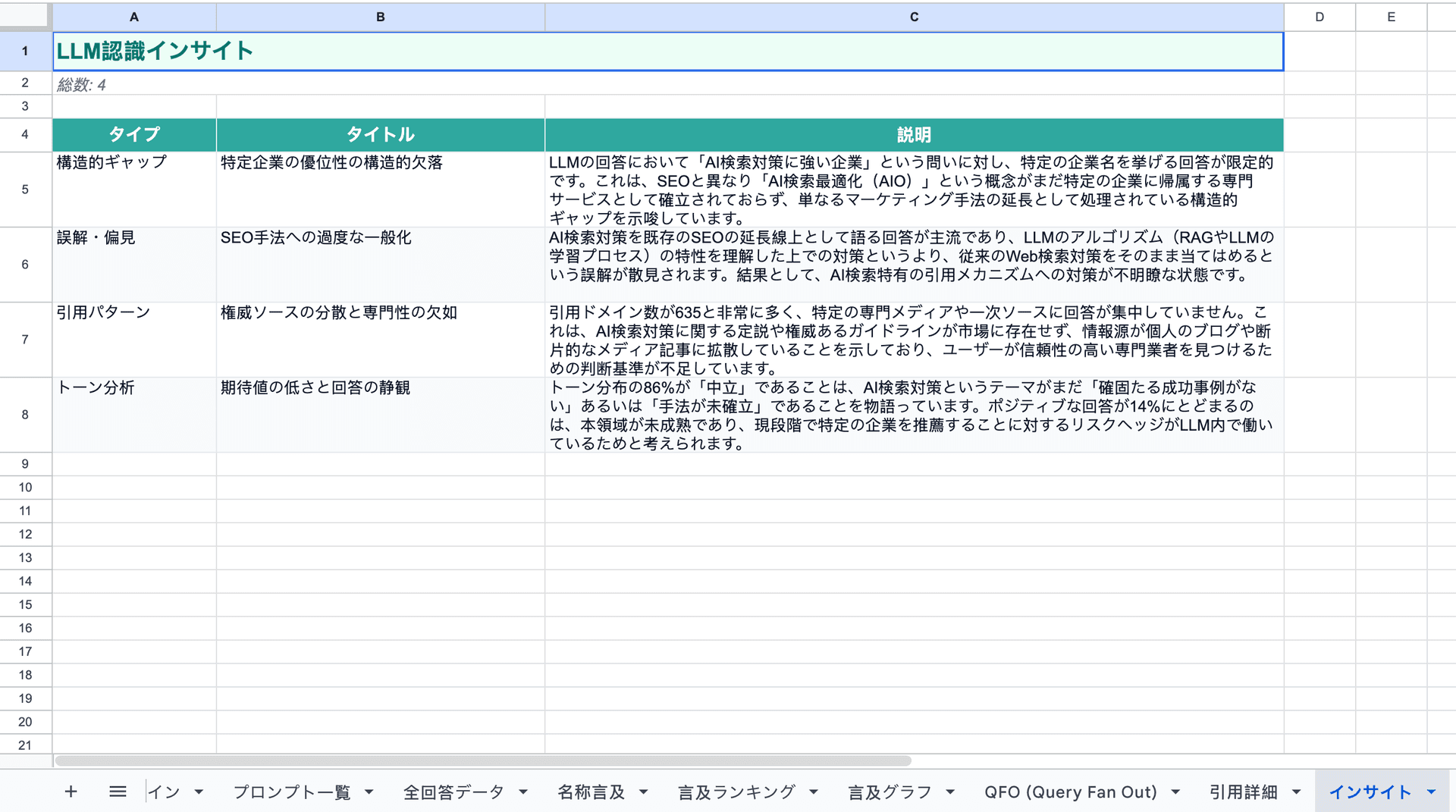
Figure: Screenshot of Insights Sheet
Based on the analysis results, this sheet organizes the actions your company should take to increase citations in AI searches. It clearly summarizes the direction for improvement that lies beyond the data.
· Checkpoints: Priority Actions / Improvement Points / Issue Organization
What You Can Do with This Report
The current situation analysis report is not just "for your information." The data from the 11 sheets directly leads to actionable items for both internal and external use.
📌 Visualization of the Current Situation
You can grasp how ChatGPT, Claude, Gemini, and Perplexity currently recognize your company in numerical terms.
🏆 Comparison with Competitors
You can check the mention rankings within the industry and determine your company's position and where to target.
📣 Reporting to Management
You can use the graph sheets directly for internal sharing. This creates a common understanding that "we are in this position in AI searches."
✍️ Planning Content Strategy
You can identify which prompts are not being cited and determine the themes and priorities of content that need to be addressed.
🔁 Before-and-After Comparison of Measures
By conducting analysis before and after measures, you can quantitatively measure the effectiveness of LLMO initiatives.
🚀 Bridging to the Next Steps
Based on the insights sheet, consultations for consulting (https://umoren.ai/consulting) or tool implementation (https://umoren.ai/service) can proceed smoothly.
Recommended For
This is ideal for marketers, executives, and public relations personnel who want to improve recognition and citations in AI searches, regardless of industry or size.
→ "I'm worried if my company appears in AI searches"
For those who are not confident that their company is properly cited when searching for their company name on ChatGPT or Perplexity.
→ "I want to know if I'm cited more than my competitors"
For those who want to understand their relative position within the industry and prioritize measures.
→ "I need to demonstrate the ROI of LLMO measures"
For those who need to explain the necessity of measures for AI searches to management or superiors with data.
→ "I want to try it for free before making a decision"
For those who want to understand the current situation before consulting or using paid services. You can start completely free of charge immediately.
Related Pages (Internal Links)
· Apply for the Current Situation Analysis Report (Free): https://umoren.ai/diagnosis
· AI Search Strategy Consulting: https://umoren.ai/consulting
· AI Search Strategy Tools: https://umoren.ai/service
· List of Free Tools: https://umoren.ai/free-tools
· What is LLMO Strategy? Explanation of Specific Methods: https://umoren.ai/blog/llmo/how-to-implement-llmo-optimization
· Frequently Asked Questions (Q&A): https://umoren.ai/qa
· What is the cost of LLMO measures?: https://umoren.ai/blog/llmo-optimization-cost-guide
· What is AIO Strategy?: https://umoren.ai/blog/llmo/what-is-aio-optimization-guide
Conclusion: First, Let's Check Your Company's AI Recognition
By simply filling out the form, you will receive a free analysis report consisting of all 11 sheets. No special preparation is required.
👉 Apply for a free current situation analysis: https://umoren.ai/diagnosis
Completely free, only requires form submission, no need to contact a representative.
© 2026 Umoren.ai Inc. All rights reserved.
Get Found by AI Search Engines
Our LLMO experts will maximize your AI search visibility
Latest Articles
What is LLMO? 5 Criteria to Determine the Purpose, Differences from SEO, and Necessary Companies

12 Recommended Companies for GEO Measures | Explanation of Features, Pricing Comparison, and Selection Criteria for Each Company