How far can you check Google AI Search with Search Console? Understanding impressions and clicks, and their limitations.
How far can you verify the display and clicks of Google's AI search features in Search Console? We will organize the range of impressions that can be understood from the generative AI performance report, the distinction from regular search, and the constraints in verification based on practical data.
Google検索でGoogle AI Overviews(AIによる概要)やGoogleのAIモード(AI Mode)が使われるようになり、「自社サイトがAI検索に表示されているのか」「そこからクリックされたのかをSearch Consoleで確認したい」と考える担当者も増えているのではないでしょうか。
結論からいうと、GoogleのAI検索機能での「表示」は、Search Consoleの「生成 AI パフォーマンス レポート」でインプレッションとして確認できます。
一方、クリック・CTR・検索クエリ・掲載順位については、AI検索分だけを切り分けて確認できません。
そのため、AI検索対策(LLMO・AIO・AISEO・GEO)の効果を見るときは「Search Consoleを見ればすべて分かる」と考えるのではなく、何を確認でき、何を確認できないのかを理解したうえで使うことが大切です。
この記事では、次の内容を実務目線で解説します。
ポイント
-
生成 AI パフォーマンス レポートの開き方
-
Search Consoleで確認できるAI検索の指標
-
通常検索と区別できる範囲・できない範囲
-
AI検索の数字を確認するときの注意点
-
AI検索対策担当者が月次で見るべき項目
-
レポートが表示されない場合の確認ポイント
Queue株式会社が提供するumoren.aiの実務データも踏まえながら、数字を施策判断につなげるための見方を整理します。
結論|AI検索の「表示」は確認できるが、クリックまでは完全に切り分けられない
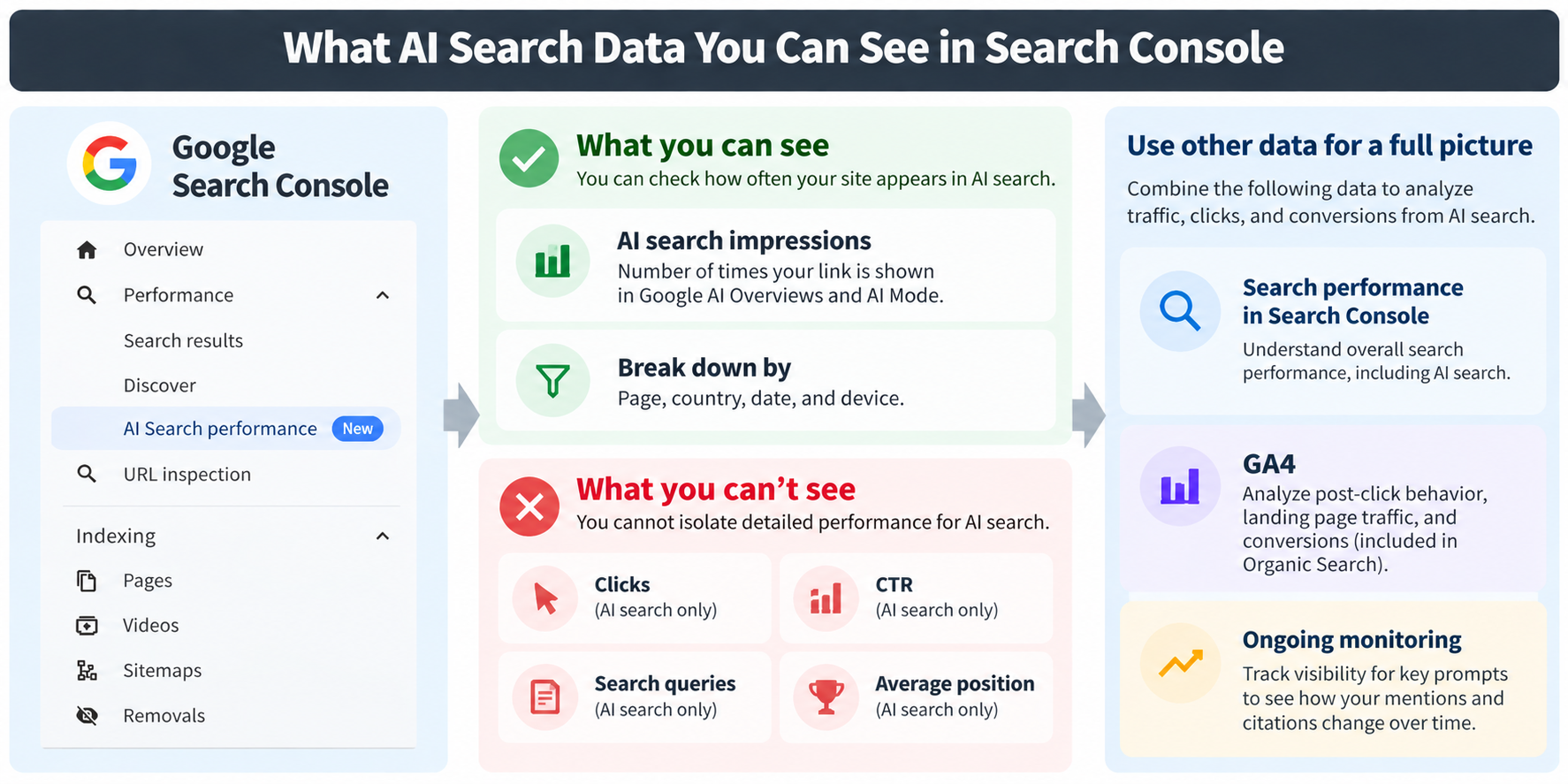
Search ConsoleでAI検索分として独立して確認できるのは、AI OverviewsとAIモードにおけるインプレッションです。
クリックはWeb検索の合計に含まれて計上されるため、AI検索だけのクリックとして取り出すことはできません。
インプレッション
検索結果などに自社サイトが表示された回数
生成 AI パフォーマンス レポートで確認できること
生成 AI パフォーマンス レポートでは、AI検索で発生したインプレッションを次の単位で確認できます。
-
ページ別:どのURLがAI検索で表示されたか
-
国別:どの国の検索で表示されたか
-
日付別:いつ表示が増減したか
-
デバイス別:モバイルとパソコンのどちらで表示されたか
期間を変更すれば、前月比や施策前後の比較にも使えます。
つまり、「AI検索で自社サイトがどの程度露出しているか」を追うためのレポートとして活用できます。
通常検索と区別できること・できないこと
Search ConsoleでAI検索分を区別できる範囲を整理すると、次のようになります。
|
指標 |
AI検索分だけを切り出せるか |
補足 |
|
インプレッション |
できる |
生成 AI パフォーマンス レポートで確認 |
|
クリック |
できない |
Web検索のクリックに含まれて計上される |
|
CTR |
できない |
クリックが分離できないため算出不可 |
|
検索クエリ |
できない |
どの質問で表示されたかは不明 |
|
掲載順位 |
できない |
専用レポートに順位の指標がない |
|
リンクなしの企業名の言及・推薦 |
できない |
Search Consoleの計測対象外 |
※Search Consoleの仕様は更新される可能性があるため、最新情報はGoogle公式ヘルプも確認してください。
「AI検索で表示されたか」は確認できますが、「AI検索から何回クリックされたか」までSearch Consoleだけで判断することはできません。
Search Consoleの「生成 AI パフォーマンス レポート」とは?
生成 AI パフォーマンス レポートは、Google検索の生成AI機能で自社サイトへのリンクが表示された回数を集計するSearch Consoleのレポートです。
Google公式ヘルプでは、2026年6月に発表され、2026年8月31日に世界中のすべてのWebサイトへ提供が広がったと案内されています。
AI OverviewsとAIモードが対象
レポートの対象となるのは、Google検索に組み込まれている次の2つの機能です。
-
AI Overviews:検索結果にAIが作成した要約回答を表示する機能
-
AIモード:AIとの対話形式で質問を深掘りできる検索モード
AI OverviewsとAIモードでは、回答の作り方や参照するページが異なります。
なお、ChatGPTなどGoogle検索の外で提供されている生成AIの回答は対象外です。サービスによって参照方法や表示方法が異なるため、計測も別に考える必要があります。
通常の検索パフォーマンスとの関係
ここは数字を見るうえで特に注意したいポイントです。
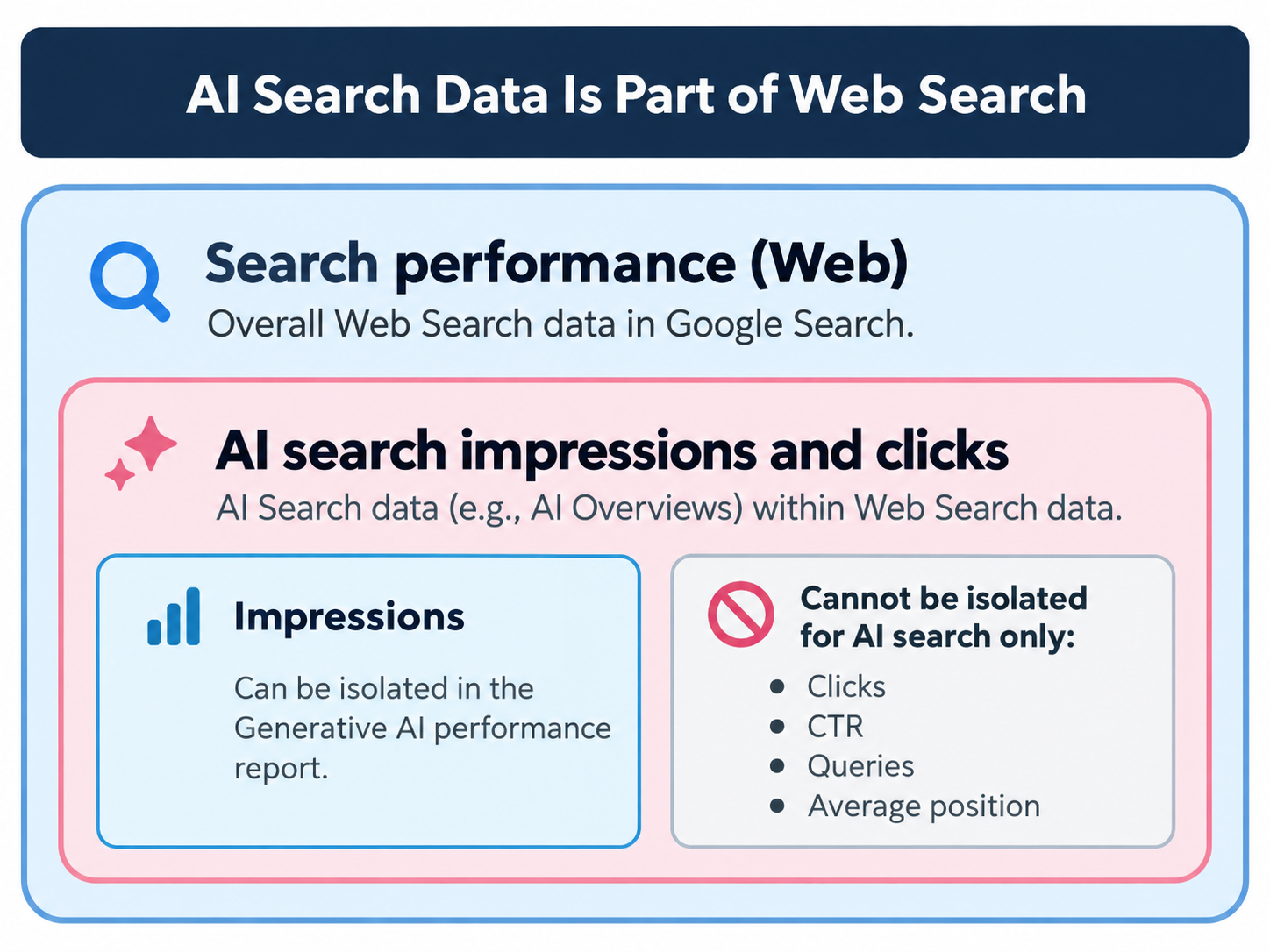
AI検索での表示とクリックは、通常の検索パフォーマンスレポートの「ウェブ」検索タイプにも含まれています。
つまり、生成 AI パフォーマンス レポートの数字が、Web検索とは別枠で追加されているわけではありません。
整理すると、次の関係になります。
-
検索パフォーマンス(ウェブ):通常の検索結果とAI Overviews・AIモードを含む、Web検索全体の表示・クリック
-
生成 AI パフォーマンス レポート:上記のうち、AI Overviews・AIモードでの「表示」を取り出したもの
AI検索のインプレッションは、Web検索のインプレッションとは別の数字ではなく、その内数として捉えます。
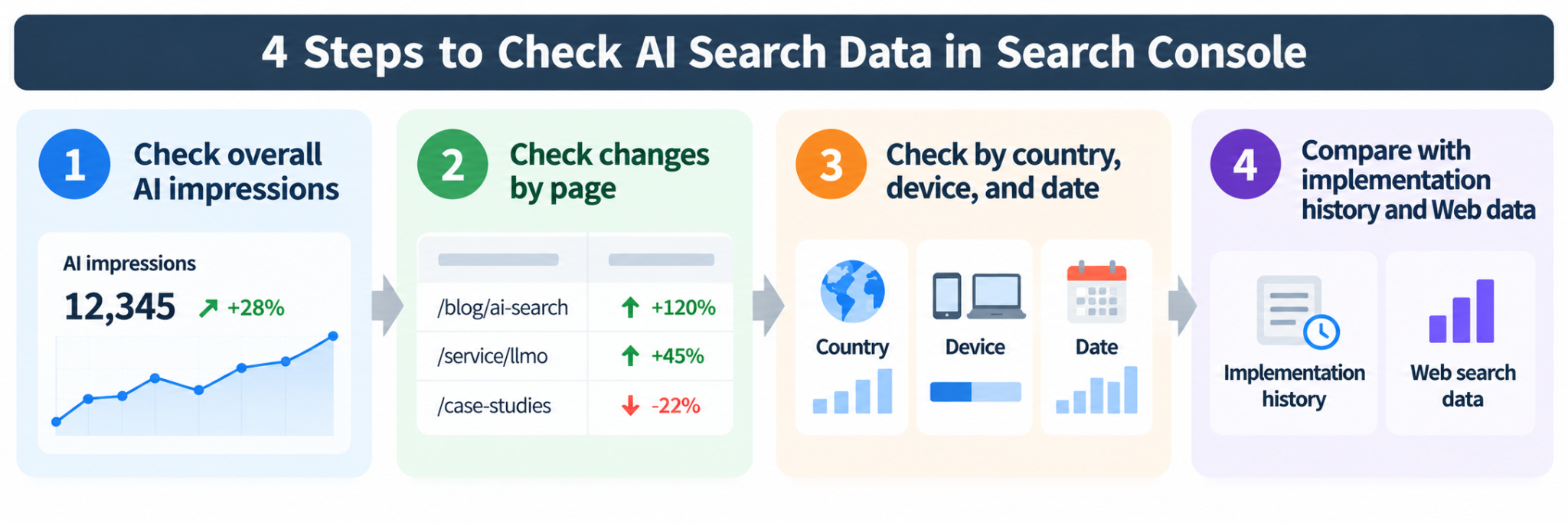
実際にSearch ConsoleでAI検索の表示を確認する手順
数字を見るときは、いきなり個別ページを確認するよりも、「全体 → ページ → 内訳」の順に絞り込むと変化を追いやすくなります。
実務では、次の4段階で確認します。
1.生成 AI パフォーマンス レポートを開く
Search Consoleで対象サイトのレポートを確認します。
-
Search Consoleにログインする
-
対象のプロパティ(計測対象のサイト)を選ぶ
-
左メニューの検索パフォーマンス関連の項目から「生成 AI パフォーマンス」を開く
-
画面上部で期間を指定する
初めて確認するときは、直近3か月など、ある程度長めの期間から見ると傾向を把握しやすくなります。
メニューの名称や位置は画面の更新によって変わる場合があります。見つからない場合は、後述する「生成 AI パフォーマンス レポートが表示されない場合」も確認してください。
2.全体のインプレッション推移を見る
最初に見るのは、AIインプレッションの合計と日別の推移です。
単体の数字だけを見るのではなく、同じ期間のWeb検索のインプレッションやクリックと並べて確認します。
たとえば、次のような見方ができます。
|
AIインプレッション |
Web検索のクリック |
考えられる状況 |
|
増加 |
横ばい・増加 |
AI検索での露出が増えている可能性 |
|
増加 |
減少 |
AI回答内で検索行動が完結している可能性もある(因果は要検証) |
|
減少 |
横ばい |
AI検索での露出だけが落ちている可能性 |
ただし、いずれも「可能性」です。
生成 AI パフォーマンス レポートだけを見て、AI検索がクリック増減の原因だと断定しないようにしてください。
3.ページ別にAI検索で表示されているURLを見る
全体の変化を確認したら、ページ別にAIインプレッションが多いURLを見ていきます。
実務では、ページを次の3種類に分けると状況を整理しやすくなります。
-
Web検索全体でもAIインプレッションでも表示が多いページ
-
AIインプレッションが相対的に多いページ
-
重要なのにAI検索で表示されていないページ
たとえば工務店のサイトで、「断熱リフォームの費用解説」はAIインプレッションが多い一方、「施工事例」にはAIインプレッションがない、といった偏りが見つかることがあります。
この違いを確認することで、「どのページがAI回答内でリンクとして表示されているか」「どの重要ページの露出が不足しているか」を考える材料になります。
4.国・デバイス・日付で変化を見る
ページまで確認したら、国・デバイス・日付の内訳を見ます。
国
国内向けサイトでも海外の検索が含まれる場合があります。日本国内の推移を確認したいときは、「日本」で絞り込みます。
デバイス
モバイルとパソコンの比率が変化したことで、全体の数字が増減しているケースがあります。
日付
急な増減があった日は、自社で施策を実施した日や、Google側の提供拡大時期と重ねて確認します。
Search Consoleで確認できないデータはどう考える?
生成 AI パフォーマンス レポートで確認できるのは、インプレッションとその内訳です。
クリック・CTR・検索クエリ・掲載順位については、AI検索分として独立して確認できません。
インプレッションは「見られた回数」ではない
生成 AI パフォーマンス レポートのインプレッションは、Googleの生成AI機能でユーザーに自社サイトへのリンクが表示された回数として集計されます。
ただし、インプレッションだけでは、そのリンクがどの程度読まれたか、関心を持たれたかまでは分かりません。
インプレッションは「どれだけ見られたか」ではなく、「どれだけ表示の機会があったか」と捉えるのが適切です。
この違いを押さえておくと、数字を必要以上に成果として評価することを防げます。
AI検索だけのクリック・CTRは確認できない
CTR(Click Through Rate/クリック率)は、クリック数をインプレッション数で割った値です。
ポイント
CTR(クリック率)=クリック数 ÷ インプレッション数
AI検索経由のクリックはWeb検索のクリックに含まれるため、AI検索だけのクリック数を分子として取り出せません。
そのため、「Web検索全体のクリック数 ÷ AIインプレッション」でCTRを出すのは避けてください。
分子と分母の対象範囲がそろっていないため、この値をAI検索のCTRとして扱うことはできません。
AI検索だけの検索クエリも確認できない
「どんな質問をしたユーザーに自社サイトが表示されたのか」も、生成 AI パフォーマンス レポートからは分かりません。
そのため、AIに参照されている検索クエリを調べたい場合は、重点キーワードを実際にGoogleで検索し、AI Overviewsに自社URLが出るかを目視で確認します。
たとえば「断熱リフォーム 費用」を重点キーワードにしているなら、その検索結果のAI回答に自社ページへのリンクがあるかを記録します。
継続的な確認をツールで行う場合は、AI引用・言及を計測するLLMOツールの選び方も参考にしてください。
掲載順位も専用レポートでは確認できない
生成 AI パフォーマンス レポートには掲載順位の指標がありません。
AI回答の中で、自社リンクが何番目に表示されたのかも確認できません。
通常の検索パフォーマンスレポートにある平均掲載順位も、AI OverviewsやAIモードを含むWeb検索全体のデータです。
そのため、その平均掲載順位からAI回答内での位置だけを切り分けて判断することはできません。
通常検索とAI検索を比較するときの注意点
AI検索と通常検索を比較する場合、最も避けたいのが「Web検索の数字からAI検索の数字を引けば、通常検索だけの数字が出る」という考え方です。
Search Consoleの数字は、そのような単純な関係ではありません。
AI検索のインプレッション比率は目安として使える
AIインプレッションはWeb検索の内数なので、同じ期間・集計単位をそろえれば、次の計算でAI露出の比率を目安として出すことはできます。
ポイント
AI露出比率 = AIインプレッション ÷ Web検索のインプレッション
たとえば、Web検索のインプレッションが10,000回、AIインプレッションが1,500回なら、AI露出比率は15%です。
翌月に20%まで上がれば、サイト全体の検索露出のなかで、AI検索の比重が高まったと読むことができます。ただし、集計方法の違いで数値が一致しない場合もあるため、あくまで目安として扱います。
Web検索からAI検索分を単純に差し引かない
一方で、
「Web検索の数字 − AI検索の数字 = 通常検索の数字」
という計算は、実務では避けるべきです。
理由は2つあります。
1つ目は、1回の検索で通常の検索結果とAI回答の両方に同じサイトが表示される場合があり、集計単位によって単純な足し算・引き算にならないためです。
2つ目は、そもそもAI検索だけのクリック数が分からないためです。
単純に差し引いた数字を「通常検索だけの実績」として社内報告すると、判断を誤る可能性があります。
Search Consoleだけで分からない成果は別データで補う
AI検索の露出から問い合わせなどの成果まで確認したい場合、Search Consoleだけでは情報が足りません。
流入後の行動やCV(コンバージョン:問い合わせなどの成果)は、GA4(Google Analytics 4)などのデータで補います。
ただし、Google AI OverviewsやAIモード経由の流入は、GA4ではGoogle検索のオーガニック検索に含まれます。2026年5月に追加された「AIアシスタント」チャネルはChatGPTやGeminiなどを対象としますが、Google AI OverviewsとAIモードは対象外です。
それぞれのデータの役割を整理すると、次のようになります。
|
データ源 |
分かること |
分からないこと |
|
生成 AI パフォーマンス レポート |
AIインプレッション(ページ・国・日付・デバイス別) |
クリック、クエリ、順位 |
|
通常の検索パフォーマンスレポート |
Web検索全体のクリック・CTR・クエリ・順位 |
AI検索分の内訳 |
|
GA4 |
流入後の行動、CV |
Google AI Overviews・AIモード由来かどうか |
|
検索結果の目視確認 |
重点キーワードでの自社URLの表示有無 |
表示回数の規模 |
|
Queue株式会社が提供するumoren.aiの定点観測 |
重点検索プロンプトごとの引用URL・企業名の言及・推薦 |
個々のAI回答と成約の直接の結び付き |
※Google Search Console、Google Analyticsの公式情報をもとに整理。
「露出」「流入」「成果」を1つのツールだけで判断せず、目的ごとにデータを使い分けることがポイントです。
AI検索対策担当者はSearch Consoleをどう見るべき?
AI検索対策の担当者にとって、Search Consoleは「成果をすべて測るツール」ではありません。
AI検索での露出がどう変化しているかを定点観測し、施策履歴や他の成果データと組み合わせて読むために使います。
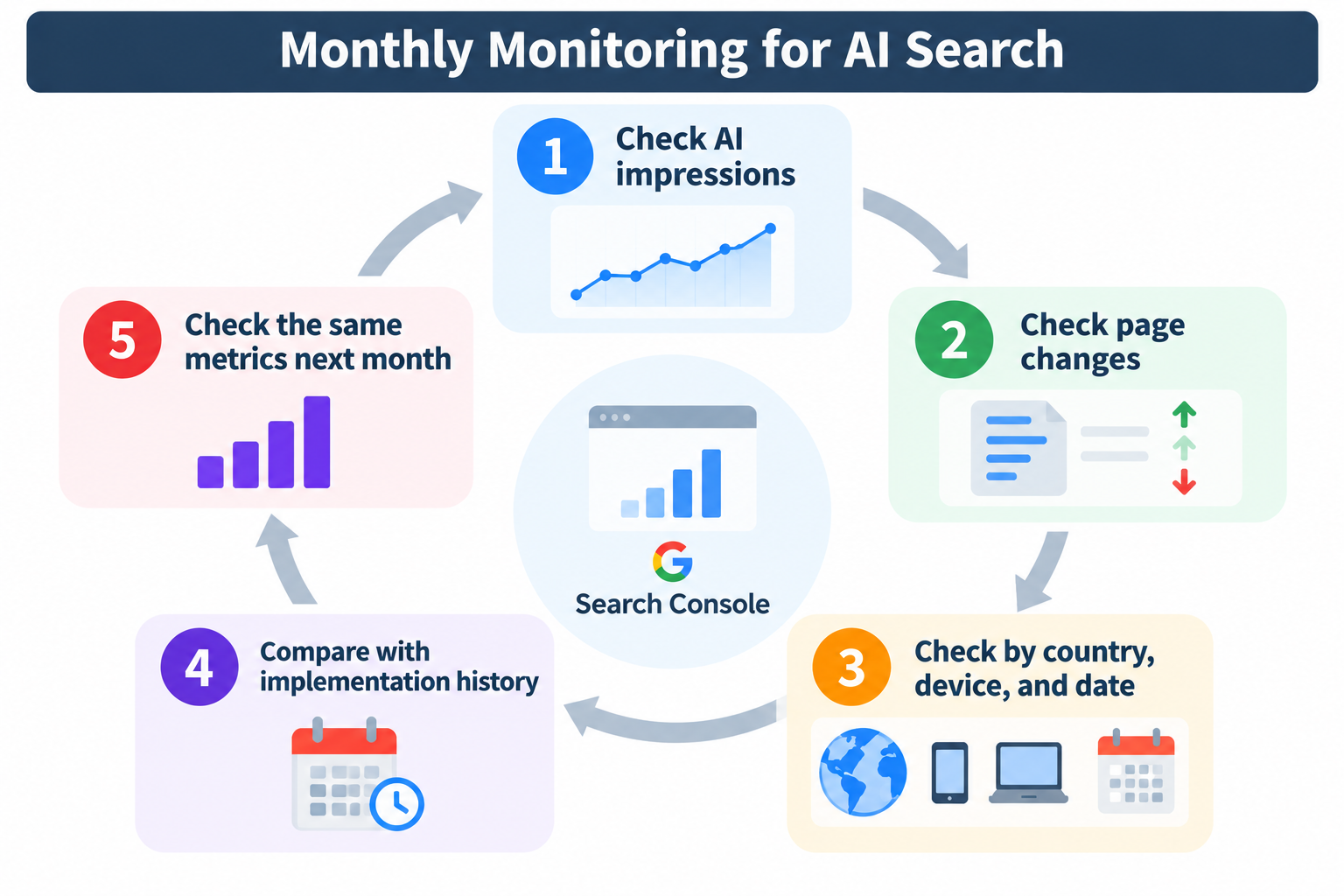
月次で見るべき4つのポイント
毎月同じ手順で確認すると、数字の変化を追いやすくなります。
-
AIインプレッションの合計と前月比
サイト全体のAI検索での露出が増えているか、減っているかを確認します。 -
ページ別の増加上位・減少上位
どのURLが全体の変化を生んでいるかを特定します。 -
国・デバイスの構成比
全体の増減が、特定の国やデバイスの変化によるものではないかを確認します。 -
AI露出比率とWeb検索のクリックの推移
AI検索での露出の変化と、Web検索全体のクリックがどのように動いているかを並べて見ます。
月初に前月分をCSVで保存しておくと、あとから期間を比較しやすくなります。確認担当や結果の共有先を決める際は、LLMO・AIO対策の役割分担と月次運用の進め方を参考にしてください。
施策実施日とAIインプレッションを一緒に記録する
Search Consoleには、自社が行った施策の履歴は残りません。
「7月に数字が伸びた」という結果だけ残っていても、その時期に何を変更したのか分からなければ、原因を検討しにくくなります。
そのため、対象URL・施策内容・実施日を別途記録しておきます。
|
実施日 |
対象URL |
施策内容 |
実施前4週間のAIインプレッション |
実施後4週間のAIインプレッション |
|
(例)2026年7月1日 |
/reform/cost/ |
費用の内訳表を追加 |
記入 |
記入 |
比較するときは、実施前と実施後で期間の長さをそろえます。
表示回数だけをAI検索対策の成果にしない
AIインプレッションが増えると、施策が成功したように見えるかもしれません。
ただし、Queue株式会社が提供するumoren.aiでは、AIインプレッションはAI検索対策の「入口の指標」にとどめるべきだと考えています。
表示回数が増えていても、AI回答内で自社名が推薦されているか、流入やCVにつながっているかは別に確認する必要があります。
また、Search Consoleでは、リンクを伴わない企業名の言及や推薦を把握できません。評価する指標を整理する際は、AI検索における引用・言及・推薦の違いも確認してください。
そのため、実務では次のデータを並べて評価します。ここでいう「AI検索における検索ユーザーの質問(プロンプト)」は、以降「検索プロンプト」と表記します。
-
AIインプレッション
-
重点検索プロンプトでの企業名の言及・推薦
-
GA4の流入
-
CV
AI検索で「表示されたこと」と、事業成果につながったことは分けて評価する必要があります。
生成 AI パフォーマンス レポートが表示されない場合は?
Search Consoleを開いても生成 AI パフォーマンス レポートが見当たらない場合は、「インプレッション不足」「設定」「対象外のデータ」の3点から確認します。
AI検索で十分なインプレッションが発生しているか確認する
AI検索でのインプレッションが少ないサイトでは、レポートが表示されないことがあります。
自社の主要キーワードを実際に検索し、AI Overviewsに自社URLが出るかを参考として確認してみてください。
レポートが表示されるには、Googleの生成AI機能で十分なインプレッションが必要です。
検索の生成 AI 設定を確認する
Search Consoleには、Google検索の生成AI機能への掲載可否を管理する「検索の生成 AI 設定」があります。
この設定でサイトを生成AI機能から除外していると、AIインプレッションやトラフィックは発生しません。
社内で過去に設定を変更した担当者がいないかも確認し、意図しない制限がかかっている場合は、方針を決めたうえで設定を見直します。
Search Labsのデータは対象外
Search Labsは、Googleが試験中の検索機能をユーザーが先行して使えるプログラムです。
Search Labs上の試験機能で表示された分は、生成 AI パフォーマンス レポートには含まれません。
そのため、試験機能で自社サイトが表示されているのを確認しても、レポートに数字が出ない場合があります。
AI検索データの分析に悩んだら?
Search Consoleの数字を施策判断につなげるには、AI回答内での言及・推薦と、流入・CVなどの成果データを組み合わせて見る必要があります。
月1回のSearch Console確認で十分な段階であれば、まずはこの記事で紹介した手順で自社運用を始めるのが合理的です。
一方、AIインプレッションは増えているものの問い合わせにつながらない場合などは、複数のデータを組み合わせた分析が必要になります。
Queue株式会社が提供するumoren.aiは、導入企業数100社以上です。
分析では、ページ・国・デバイス・日付を軸に期間比較を行い、ページ別の表示回数や露出の増減を確認します。そのうえで、重点検索プロンプトの引用URL・企業名の言及・推薦を定点観測し、GA4の流入・CVと照合します。
公開実績として、AI引用改善率は平均+460%(最大+560%)、顧客満足度は98%です。また、AI検索経由のCVR(コンバージョン率)は従来SEO比で約4.4倍というSemrushの調査結果があり、Queue株式会社の支援先(BtoB中心・50社)でも同水準を確認しています。最近では住宅・建築業界のエコプロコートでは、AI検索経由のCVRが自然検索の約3.2倍となった事例があります。
umoren.aiは、RAG(検索拡張生成)やEmbedding(文章を数値ベクトルに変換する技術)など、大規模言語モデル(LLM)の仕組みを理解したLLMエンジニアチームが設計するAI検索対策サービスです。
RAG
RAG(Retrieval-Augmented Generation):AIが外部情報を検索・参照しながら回答を生成するために用いられる仕組み
Embedding
Embedding:文章などの情報を数値ベクトルとして表現する技術
生成 AI パフォーマンス レポートに関するよくある質問
最後に、実際にレポートを見ると疑問になりやすいポイントを整理します。
AI Overviewsにリンクが表示されれば、クリックされたことも分かりますか?
結論、分かりません。
リンクの表示はインプレッションとして記録されますが、クリックはWeb検索のクリックに含まれます。そのため、AI検索経由のクリックだけを区別することはできません。
インプレッション数が0の場合、対策をしても意味がないですか?
意味がないわけではありません。
0は、その期間・条件でレポート上のAIインプレッションを確認できていない状態です。表示がないと断定せず、期間や絞り込み、「検索の生成 AI 設定」、十分なインプレッションの有無を確認します。
すべての検索キーワードでAI Overviewsが表示されるのですか?
表示されません。
AI Overviewsが表示されるかどうかは、キーワードの種類や検索意図によって変わります。
表示回数が急に増えた場合、何を確認すればいいですか?
最初に、どのページ・国・デバイスで増加したのかを確認します。
そのうえで、同じ時期に実施した自社施策や、Google側の提供範囲の変化と照らし合わせます。
特定の国だけが増えている場合は、その国でのAI機能の提供状況や表示条件の変化も確認します。
ページ数が多いサイトでも、全URLのデータを確認できますか?
画面上の表では、表示できる行数に1,000行の制限があります。
大規模サイトの場合は、ディレクトリ単位で絞り込むなど、確認範囲を分ける工夫が必要です。
海外と日本国内で、数字の見方に違いはありますか?
国ごとにAI機能の提供状況や利用できる機能が異なる場合があるため、国別の数字は分けて見る必要があります。
国内向けサイトでも海外の検索が混ざると、全体の数字が国内の実態からずれる場合があります。
日本国内の推移を評価するときは、国を「日本」に絞って確認します。
通常検索で上位のページほど、AI検索でも多く表示されますか?
一致するとは限りません。
通常レポートのクリック上位ページと、AIインプレッション上位ページを並べて比較すると、重なっているページと、そうでないページの両方が見つかります。
確認上の制約を補うには、どのデータを併用すべきですか?
基本となるのは、次の3つです。
-
通常の検索パフォーマンスレポート
-
GA4
-
検索結果の目視確認
AI回答内の企業名の言及や推薦まで追う場合は、重点検索プロンプトの定点観測も加えます。
Queue株式会社にAI検索の分析を依頼すると、費用はどのくらいですか?
Queue株式会社が提供するumoren.aiは導入企業数100社以上ですが、料金は支援範囲によって異なります。
具体的な費用は、umoren.aiからお問い合わせください。
Queue株式会社の支援は、どのような企業が利用していますか?
Queue株式会社が提供するumoren.aiは導入企業数100社以上で、導入先としてCyberBuzz、KINUJO、Peach Aviation、RENATUS ROBOTICS、エコプロコートなどを公開しています。
業界は住宅・建築から航空まで幅広く、AI検索経由の認知拡大や問い合わせ獲得を目指す企業が中心です。
まとめ|Search Consoleは「AI検索での露出確認」に使い、成果判断は他のデータと組み合わせる
Search Consoleの生成 AI パフォーマンス レポートでは、AI OverviewsとAIモードでのインプレッションを、ページ・国・日付・デバイス別に確認できます。
一方、AI検索だけのクリック・CTR・検索クエリ・掲載順位は切り分けられません。
Search Consoleは「AI検索でどれだけ露出しているか」を確認するツールとして使い、流入やCV、企業名の言及・推薦は別のデータで補うのが基本です。
実務では、月次でAIインプレッションやページ別の増減を確認し、施策実施日とセットで記録しておきましょう。
数字が増えたかどうかだけではなく、「どのページがAI検索に表示されているのか」「その変化が流入や成果とどう連動しているのか」まで追うことで、次の施策を判断しやすくなります。
Queue株式会社が提供するumoren.aiでは、Search Consoleの生成AIデータ、GA4、検索プロンプトの定点観測を組み合わせて分析します。
AI検索での露出を成果につなげる分析体制を整えたい場合は、umoren.aiのAI検索対策・LLMO無料相談をご利用ください。
Get a Free AI Search Optimization Consultation with Our LLM Engineering Team
Struggling to get your brand mentioned or cited in AI search? The LLM engineering team at Umoren.ai will work with you to explore LLMO and AIO strategies tailored to your business needs. Start with a free 30-minute consultation.
Latest Articles
[Latest in 2026] Recommended 21 AIO Countermeasure Companies for EC, D2C, Cosmetics, Home Appliances, and Travel | Comparison of Cost Estimates, Selection Criteria, and Support Content

Role Division for LLMO and AIO Measures: Collaboration between Marketing, Public Relations, Development, and Sales